Interoperability with 'ggraph' and 'sf'
Sysbiolab Team
2026-10-19
Source:vignettes/articles/interoperability.Rmd
interoperability.Rmd
Package: RGraphSpace 1.5.7
Overview
RGraphSpace is designed to be a seamless extension to
existing network analysis workflows, not a replacement. Whether using
igraph (Csardi and Nepusz 2006)
for heavy-duty computations or tidygraph (Pedersen 2025) for tidy data manipulation,
RGraphSpace geoms automatically recognize these
objects on the fly. The main motivation behind RGraphSpace was
to address the challenge of scaling network elements without disrupting
alignment with image features. For practical examples, see mapping graphs to images; see
also PathwaySpace
tutorials for use-case scenarios involving reference image
backgrounds.
Required packages
Before proceeding, ensure that all packages described in the Installation Instructions are installed.
# Check required version
if (packageVersion("RGraphSpace") < "1.5.7"){
  message("Need to update 'RGraphSpace' for this vignette")
  remotes::install_github("sysbiolab/RGraphSpace")
}
# Load packages
library("RGraphSpace")
library("igraph")
library("tidygraph")
library("dplyr")
library("ggraph")
library("sf")
library("maps")
library("geometry")
library("flightsbr")
library("airportr")
Why use RGraphSpace with ggraph?
While ggraph is a wonderful framework for relational data,
precise edge-node alignment requires additional handling when node sizes
vary dynamically. This limitation arises from a fundamental trade-off in
ggplot2: scaling size aesthetic is tied to a fixed
physical legend representation, causing node dimensions to depend on
device scaling rather than the normalized coordinate space. For most
applications this is not an issue, but it becomes critical when graphs
must be spatially aligned with reference images. RGraphSpace
addresses this through specialized geoms that automatically
compensate for alignment shifts introduced by node scaling. The
trade-off for this higher level of automation is that the user has fewer
customization options compared to the ggraph approach. This is
exactly why using RGraphSpace alongside ggraph makes
sense: it provides precise spatial alignment between graph elements and
reference frames while preserving interoperability with the extensive
layout and styling flexibility of the ggraph grammar.
Setting basic input data
The following example demonstrates the interoperability between
RGraphSpace and ggraph using both igraph and
tidygraph objects, and managing spatial data with sf,
the standard infrastructure for spatial data analysis in R
(Pebesma and Bivand 2023). Integrating
network structures with spatial data often creates a headache with
mismatched coordinate systems and scales, which makes this example
particularly interesting to showcase how these packages handle that
complexity.
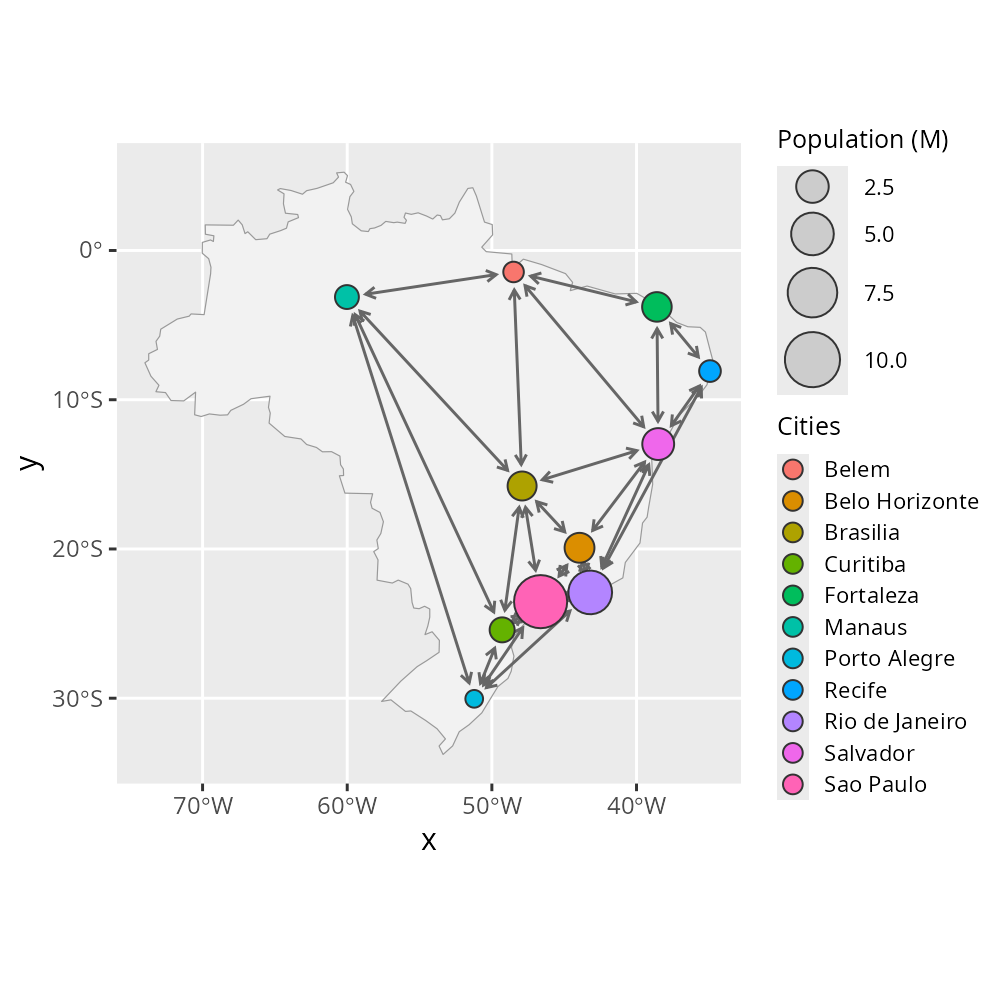
Next, we build a spatial network of cities; then RGraphSpace
geoms are plugged into ggraph and sf
workflows.
# Load a map and transform projection
map_sf <- st_as_sf(map("world", regions = "Brazil", fill = TRUE))

# Filter major cities by regional capitals
data(world.cities, package = "maps")
r_capitals <- c(
  "Aracaju", "Belem", "Belo Horizonte", "Boa Vista", "Brasilia",
  "Campo Grande", "Cuiaba", "Curitiba", "Florianopolis", "Fortaleza",
  "Goiania", "Joao Pessoa", "Macapa", "Maceio", "Manaus", "Natal",
  "Palmas", "Porto Alegre", "Porto Velho", "Recife", "Rio Branco",
  "Rio de Janeiro", "Salvador", "Sao Luis", "Sao Paulo", "Teresina",
  "Vitoria"
)
cities <- subset(world.cities, country.etc == "Brazil" &
    name %in% r_capitals & pop > 1200000)

# Create Delaunay triangulation edges
# Note: the edges hold no particular meaning beyond
# demonstrating integration between coordinate systems
tri <- delaunayn(cities[,c("lat","long")])
edges <- unique(rbind(tri[,c(1,2)], tri[,c(2,3)], tri[,c(1,3)] ))

# Build an 'igraph' using city coordinates
igraph_cities <- igraph::graph_from_edgelist(edges, directed = FALSE)
igraph::V(igraph_cities)$x <- cities$long
igraph::V(igraph_cities)$y <- cities$lat
igraph::V(igraph_cities)$Cities <- cities$name
igraph::V(igraph_cities)$`Population (M)` <- cities$pop/1000000
igraph::E(igraph_cities)$arrowType <- 3
Different input, same output
The following options all produce the same visual output, demonstrating how these packages integrate different types of input data.
# Option 1: Passing a 'GraphSpace' object directly to ggplot()
gs <- GraphSpace(igraph_cities)
ggplot(gs) +
  geom_sf(data = map_sf, fill = "grey95", color = "grey60") +
  geom_edgespace(color = "grey40", curve = -0.1) +
  geom_nodespace(aes(fill = Cities, size = `Population (M)`)) +
  scale_size(range = c(3, 9)) +
  theme_gray() +
  theme_gspace_legend(discrete_fill = TRUE)

# Option 2: Passing an 'igraph' object to RGraphSpace geoms
# inject_nodespace() required — no GraphSpace object passed to ggplot()
ggplot() +
  geom_sf(data = map_sf, fill = "grey95", color = "grey60") +
  geom_edgespace(color = "grey40", curve = -0.1, data = igraph_cities) +
  geom_nodespace(aes(fill = Cities, size = `Population (M)`),
    data = igraph_cities) +
  scale_size(range = c(3, 9)) +
  inject_nodespace() +
  theme_gray() +
  theme_gspace_legend(discrete_fill = TRUE)

# Option 3: Passing a 'tbl_graph' object to RGraphSpace geoms
# inject_nodespace() required — no GraphSpace object passed to ggplot()
gr <- as_tbl_graph(igraph_cities)
ggplot() +
  geom_sf(data = map_sf, fill = "grey95", color = "grey60") +
  geom_edgespace(color = "grey40", curve = -0.1, data = gr) +
  geom_nodespace(aes(fill = Cities, size = `Population (M)`), data = gr) +
  scale_size(range = c(3, 9)) +
  inject_nodespace() +
  theme_gray() +
  theme_gspace_legend(discrete_fill = TRUE)

# Option 4: Integrating RGraphSpace geoms into a ggraph workflow
# inject_nodespace() required — no GraphSpace object passed to ggplot()
gr <- as_tbl_graph(igraph_cities)
ggraph(graph = gr, x= gr$x, y = gr$y) +
  geom_sf(data = map_sf, fill = "grey95", color = "grey60") +
  geom_edgespace(color = "grey40", curve = -0.1) +
  geom_nodespace(aes(fill = Cities, size = `Population (M)`)) +
  scale_size(range = c(3, 9)) +
  inject_nodespace() +
  theme_gray() +
  theme_gspace_legend(discrete_fill = TRUE)
Although all four approaches produce the same visualization, only
Option 1 provides automatic node-edge synchronization. When a
GraphSpace object is passed directly to
ggplot() (Option 1), clipping metadata propagate
automatically between node and edge layers and no additional calls are
needed. In all other workflows (Options 2–4),
inject_nodespace() must be called explicitly to trigger
this synchronization. This is the only functional difference between the
four approaches; the visual output is identical.
Using RGraphSpace with sf under non-linear projections
This vignette demonstrates how to use RGraphSpace to visualize graph data within an sf spatial coordinate system under a non-linear projection. The example uses Brazilian aviation data, in which airports are represented as nodes and flights as directed edges, drawn over a basemap of Brazil. We retrieve flight records from flightsbr (Pereira 2022) and airport registries from airportr (Shkolnik 2019). The projection’s meridians converge toward the pole, so the graph needs to recognize the coordinate system in order to be drawn as part of the map rather than on top of it.
Setting basic input data
Pre-processing sets up a reference map, retrieves the aviation data,
and assembles it into node and edge tables. The basemap is a country
outline from the maps package (Becker et
al. 2025), converted to an sf object.
# Load a reference map
map_sf <- st_as_sf(map("world", regions = "Brazil", fill = TRUE, plot = FALSE))
Flight records and airport registries are published separately and use different code systems, so airport identifiers must be harmonized before the two can be matched.
# Get flights (for edges) -- this data uses IATA codes
flightsbr_2024 <- flightsbr::read_flights(date = 2024,
  select = c("sg_iata_origem" , "sg_iata_destino")
)

# Get airports (for nodes) -- this data uses ICAO codes
flightsbr_airports <- flightsbr::read_airports(type = "all") |>
  dplyr::filter(codigo_oaci %in% airportr::airports$ICAO)

# Map valid ICAO to IATA codes
flightsbr_airports <- flightsbr_airports |>
  dplyr::left_join( dplyr::select(airportr::airports, ICAO, IATA),
    by = c("codigo_oaci" = "ICAO")) |> dplyr::filter(IATA != "\\N") |>
  dplyr::relocate(IATA)
Flights are aggregated into unique routes, and the two datasets are then reduced to the airports and routes common to both, so that every edge has endpoints in the node table.
# Aggregate flights by counts
flight_counts <- flightsbr_2024 |> na.omit() |>
  dplyr::filter(sg_iata_origem != sg_iata_destino) |>
  dplyr::count(sg_iata_origem, sg_iata_destino, name = "counts") |>
  dplyr::arrange(counts)

# Keep only airports that actually appear in 'flight_counts'
active_airports <- flightsbr_airports |>
  dplyr::filter(IATA %in% c(flight_counts$sg_iata_origem,
    flight_counts$sg_iata_destino)) |>
  dplyr::select(IATA, longitude, latitude, type) |> na.omit()

# Keep flights that map to 'active_airports'
flight_counts <- flight_counts |>
  dplyr::filter(sg_iata_origem  %in% active_airports$IATA,
    sg_iata_destino %in% active_airports$IATA)

# Count departures
active_airports$departures <- tapply(flight_counts$counts,
  flight_counts$sg_iata_origem, sum)[active_airports$IATA] |>
  dplyr::coalesce(0L)

# Aggregate flight counts for undirected connections
flight_counts_undirected <- flight_counts |>
  dplyr::transmute(
    airport1 = pmin(sg_iata_origem, sg_iata_destino),
    airport2 = pmax(sg_iata_origem, sg_iata_destino),
    counts ) |>
  dplyr::group_by(airport1, airport2) |>
  dplyr::summarise(
    counts = sum(counts),
    .groups = "drop" ) |>
  dplyr::arrange(counts)
Building the graph
With the flight and airport tables prepared, we can generate an
igraph object using the flights as edges and the airports
as vertices. The graph is undirected, as departure–arrival pairs were
aggregated regardless of direction, and edge counts represent the number
of flights between each airport pair.
# Make an igraph with flight records
igraph_flights <- graph_from_data_frame(flight_counts_undirected,
  directed = FALSE, vertices = active_airports)
Although GraphSpace coordinates are normally rescaled to
a unit square, here we keep the original latitude and longitude values,
which must match the coordinates of the sf object.
# Create a GraphSpace object
gs_flight <- GraphSpace(igraph_flights)

# Assign latitude and longitude to coordinates
gs_flight$x <- gs_flight$longitude
gs_flight$y <- gs_flight$latitude

# Set 'arrowType' glyphs by token values
gs_edge_attr(gs_flight, "arrowType") <- "<->"
Rendering over the map
The graph can now be rendered over the sf basemap, with
colour representing the number of flights (log10
scale) and fill distinguishing airport types.
ggplot(data = gs_flight) +
  geom_sf(data = map_sf, color = "grey") +
  coord_sf(crs = 5880, default_crs = 4326) +
  geom_edgespace(aes(colour = log10(counts),
    alpha = counts/max(counts)), coord_warp = 1) +
  geom_nodespace(aes(fill = type,
    label = ifelse(departures > 10000, name, NA)),
    size = 1.5, colour = NA) +
  scale_colour_continuous(palette = c("cyan", "blue")) +
  scale_fill_discrete(palette = c("#F8766D", "#00BFC4")) +
  scale_alpha_continuous(range = c(0.2, 1), guide = "none") +
  labs(title = "Domestic Flight Network in Brazil, 2024",
    colour = "Flights\n(log10 scale)",
    fill = "Airport type", y = "Latitude", x = "Longitude") +
  theme_gspace_legend(discrete_fill = TRUE) +
  theme_minimal()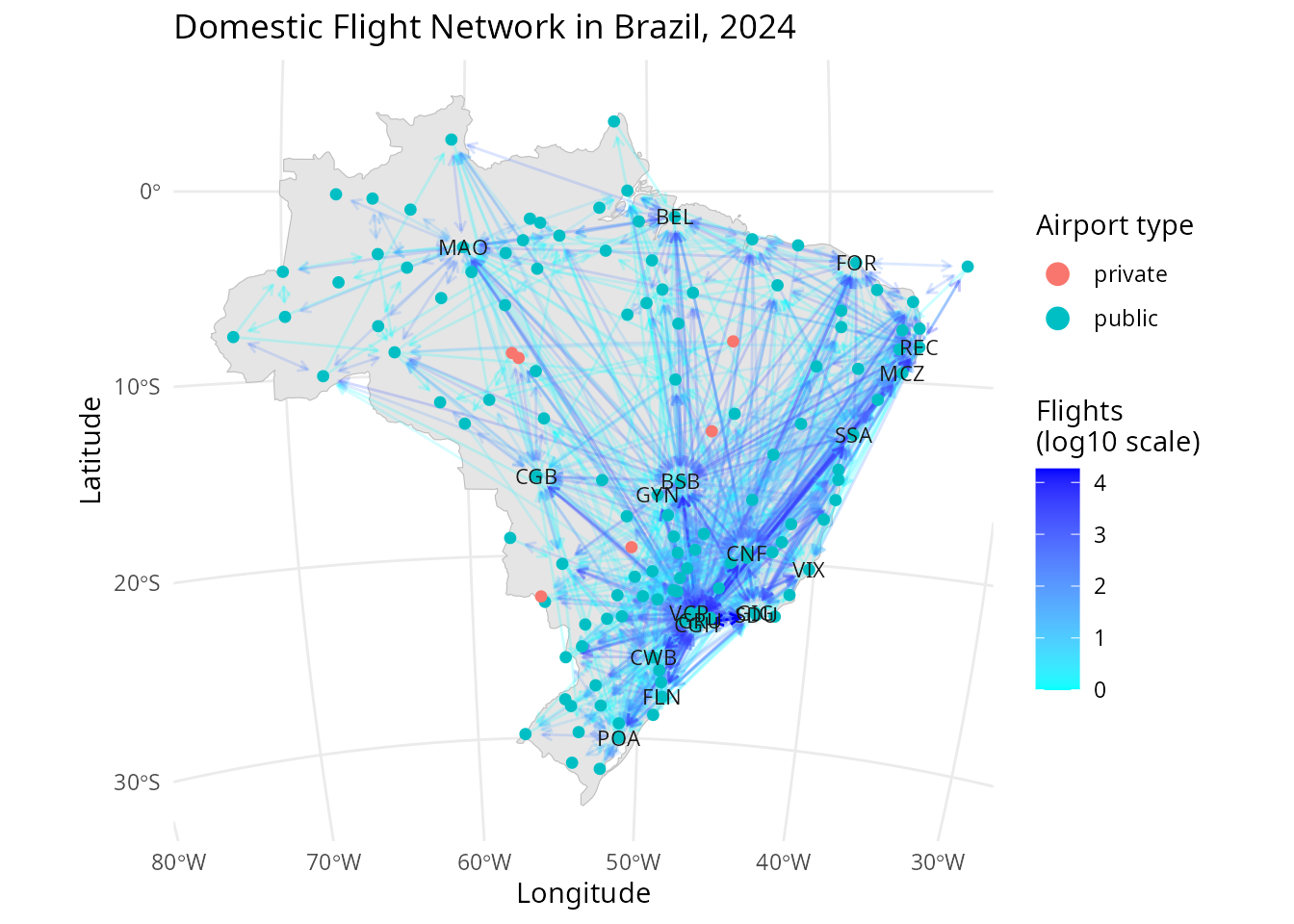
In this example, coord_sf() projects the plot into
EPSG:5880 (crs = 5880), a non-linear system
pairing the SIRGAS 2000 datum with the Brazil Polyconic
projection, while default_crs = 4326 declares that the node
coordinates are longitude and latitude in WGS 84 (World
Geodetic System 1984).
The curved gridlines are the projection’s signature: meridians converge toward the pole, so lines of constant longitude are no longer vertical. Edges curve in the same direction, following the projection rather than cutting across it, which is what makes graph and map read as one object rather than two overlaid images. The bend is strongest for long routes and negligible for short ones, since it tracks how much the projection deforms the space each edge crosses. It reflects the geometry of the projection, not the route an aircraft flies.
The strength of this effect is controlled by coord_warp,
which defaults to 1, the exact deviation introduced by the projection.
Larger values exaggerate the bend, useful where it is otherwise too
subtle to read, though they may give erratic results under strongly
warped coordinate systems. Setting coord_warp = 0 disables
the adjustment, so edges are drawn as straight chords between projected
endpoints.
A more extreme projection
The projection used above bends the space only gently, so its effect on edges is subtle. It becomes much more apparent under an extreme projection. Here the same network is viewed from the south pole, where meridians radiate outward rather than merely converging, and we use a subset of long-haul routes so that individual edges stay legible.
# Reference map: all countries, for a hemisphere-wide view
world_sf <- st_as_sf(map("world", fill = TRUE, plot = FALSE))

# A few widely separated airports, chosen to span longitude
hubs <- c("GRU", "MAO", "BEL", "REC", "POA", "CGB", "PVH", "RBR")

# Subset the 'gs_flight' object
gs_hubs <- gs_flight[gs_flight$name %in% hubs, ]
ggplot(data = gs_hubs) +
  geom_sf(data = world_sf, fill = "grey95", color = "grey70") +
  geom_edgespace(aes(colour = counts), arrow_size = 2) +
  geom_nodespace(aes(label = name), fill = NA, colour = NA) +
  scale_colour_continuous(palette = c("cyan", "blue")) +
  labs(subtitle = "Same network under a south polar projection",
    colour = "Flights\n(raw counts)",
    y = "Latitude", x = "Longitude") +
  theme_gspace_legend() + theme_minimal() +
  coord_sf(crs = "+proj=laea +lat_0=-90 +lon_0=-50",
    xlim = c(-75, -30), ylim = c(-35, 6),
    default_crs = 4326)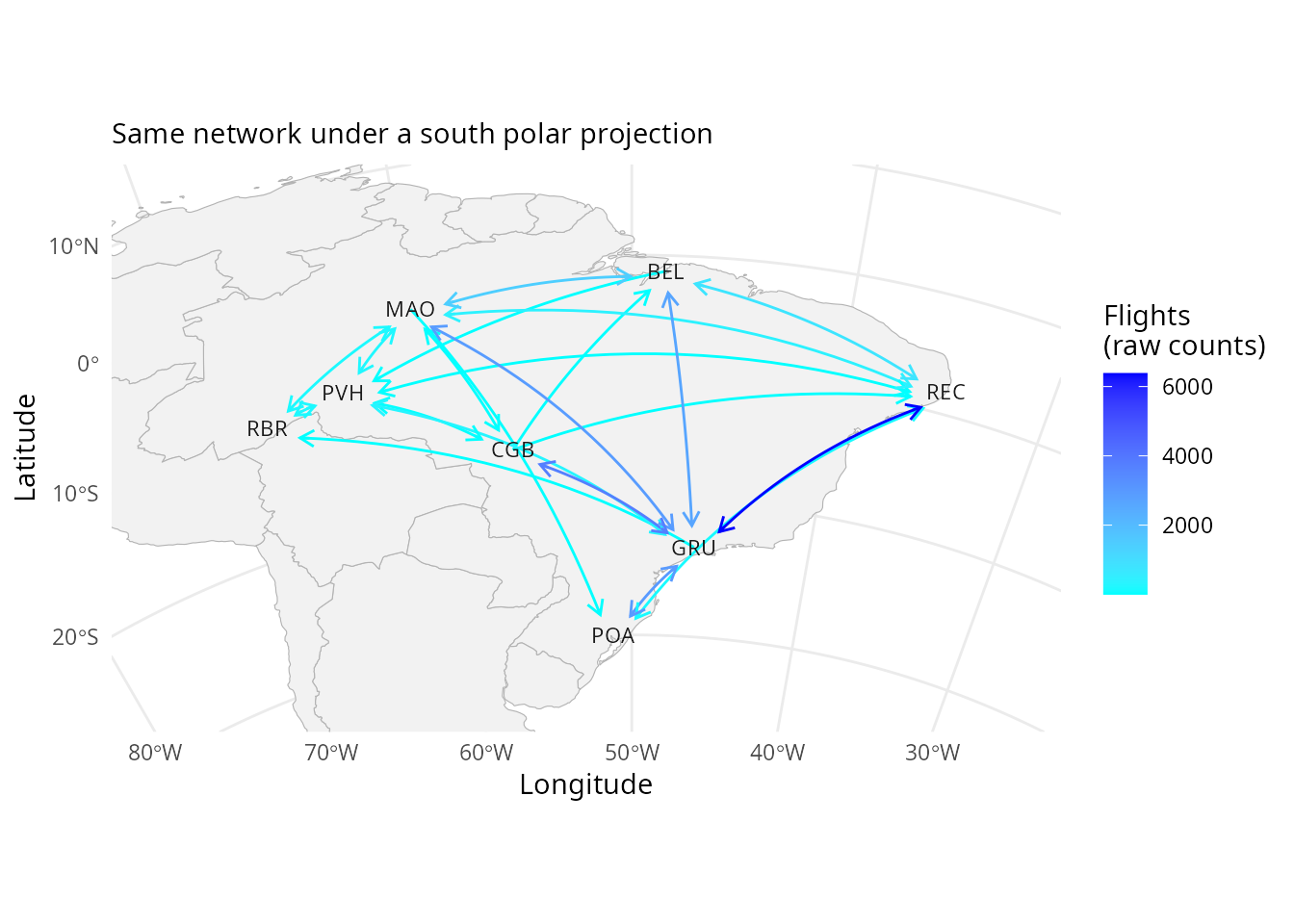
A complementary version of this vignette is available in the PreprocessingAviationData repository.
Session information
#> R version 4.6.1 (2026-06-24)
#> Platform: x86_64-pc-linux-gnu
#> Running under: Ubuntu 24.04.5 LTS
#>
#> Matrix products: default
#> BLAS:   /usr/lib/x86_64-linux-gnu/openblas-pthread/libblas.so.3
#> LAPACK: /usr/lib/x86_64-linux-gnu/openblas-pthread/libopenblasp-r0.3.26.so;  LAPACK version 3.12.0
#>
#> locale:
#>  [1] LC_CTYPE=en_US.UTF-8       LC_NUMERIC=C
#>  [3] LC_TIME=en_US.UTF-8        LC_COLLATE=en_US.UTF-8
#>  [5] LC_MONETARY=en_US.UTF-8    LC_MESSAGES=en_US.UTF-8
#>  [7] LC_PAPER=en_US.UTF-8       LC_NAME=C
#>  [9] LC_ADDRESS=C               LC_TELEPHONE=C
#> [11] LC_MEASUREMENT=en_US.UTF-8 LC_IDENTIFICATION=C
#>
#> time zone: America/Sao_Paulo
#> tzcode source: system (glibc)
#>
#> attached base packages:
#> [1] stats     graphics  grDevices utils     datasets  methods   base
#>
#> other attached packages:
#>  [1] airportr_0.1.3      flightsbr_1.1.10999 geometry_0.5.2
#>  [4] maps_3.4.3          sf_1.1-2            ggraph_2.2.2
#>  [7] dplyr_1.2.1         tidygraph_1.3.1     igraph_2.3.4
#> [10] RGraphSpace_1.5.7   ggplot2_4.0.3
#>
#> loaded via a namespace (and not attached):
#>  [1] tidyselect_1.2.1   viridisLite_0.4.3  vipor_0.4.7        farver_2.1.2
#>  [5] viridis_0.6.5      S7_0.2.2           fastmap_1.2.0      janitor_2.2.1
#>  [9] tweenr_2.0.3       digest_0.6.39      timechange_0.4.0   lifecycle_1.0.5
#> [13] magrittr_2.0.5     compiler_4.6.1     rlang_1.3.0        sass_0.4.10
#> [17] tools_4.6.1        yaml_2.3.12        data.table_1.18.4  knitr_1.51
#> [21] labeling_0.4.3     graphlayouts_1.2.4 htmlwidgets_1.6.4  classInt_0.4-11
#> [25] curl_7.1.0         xml2_1.6.0         RColorBrewer_1.1-3 abind_1.4-8
#> [29] KernSmooth_2.23-27 withr_3.0.3        purrr_1.2.2        desc_1.4.3
#> [33] grid_4.6.1         polyclip_1.10-7    e1071_1.7-17       scales_1.4.0
#> [37] MASS_7.3-66        dichromat_2.0-1    cli_3.6.6          rmarkdown_2.32
#> [41] ragg_1.5.2         generics_0.1.4     otel_0.2.0         rstudioapi_0.19.0
#> [45] httr_1.4.8         magic_1.6-1        pbapply_1.7-4      DBI_1.3.0
#> [49] ggbeeswarm_0.7.3   cachem_1.1.0       ggforce_0.5.0      proxy_0.4-29
#> [53] stringr_1.6.0      parallel_4.6.1     rvest_1.0.5        selectr_0.6-0
#> [57] ggrastr_1.0.2      vctrs_0.7.3        Matrix_1.7-6       jsonlite_2.0.0
#> [61] ggrepel_0.9.8      archive_1.1.14     beeswarm_0.4.0     systemfonts_1.3.2
#> [65] fontawesome_0.5.3  tidyr_1.3.2        jquerylib_0.1.4    units_1.0-1
#> [69] glue_1.8.1         pkgdown_2.2.0      stringi_1.8.9      lubridate_1.9.5
#> [73] gtable_0.3.6       tibble_3.3.1       parzer_0.4.4       pillar_1.11.1
#> [77] htmltools_0.5.9    R6_2.6.1           httr2_1.3.0        textshaping_1.0.5
#> [81] evaluate_1.0.5     lattice_0.23-1     snakecase_0.11.1   memoise_2.0.1
#> [85] bslib_0.11.0       class_7.3-24       Rcpp_1.1.2         gridExtra_2.3.1
#> [89] xfun_0.59          fs_2.1.0           pkgconfig_2.0.3