Using RGraphSpace with High-Dimensional Data
Sysbiolab Team
2026-09-12
Source:vignettes/articles/high-dimensional.Rmd
high-dimensional.RmdPackage: RGraphSpace 1.5.5
Overview
In this vignette, we apply RGraphSpace to a complex data
container. As an S4 class, a GraphSpace object holds
high-dimensional feature data in a dedicated slot (@fdata),
kept aligned to nodes without being merged into the node table, so these
features remain available for aesthetic mapping. We demonstrate this
using the Seurat package (Hao et al.
2024). Seurat objects encapsulate multiple
coordinated representations of single-cell data, and serve as a
representative example of such containers.
Before you start
This vignette assumes prior experience with Seurat (Hao et al. 2024), especially for handling transcriptomics data.
Note: If you are new to Seurat, we recommend reviewing its visualization tutorials before proceeding.
Computational requirement:
Hardware: RAM >= 16 GB
Software: R (>=4.5) and RStudio
Required packages
Before proceeding, ensure that all packages described in the Installation Instructions are installed.
# Check versions
if (packageVersion("RGraphSpace") < "1.5.5"){
  message("Need to update 'RGraphSpace' for this vignette")
  remotes::install_github("sysbiolab/RGraphSpace")
}
if (packageVersion("Seurat") < "5.5.1"){
  message("Need to update 'Seurat' for this vignette")
  remotes::install_github("satijalab/Seurat")
}
Setting input data
# Load packages
library("RGraphSpace")
library("Seurat")
library("SeuratObject")
library("SeuratData")
library("patchwork")
Loading the dataset
We will use the pbmc3k dataset from the
SeuratData package, consisting of single-cell transcriptomics
data from peripheral blood mononuclear cells. This dataset is commonly
used to showcase Seurat workflows (Hao
et al. 2024).
# Install a Seurat dataset (required only once)
SeuratData::InstallData("pbmc3k")
# Check manifest of installed datasets
# SeuratData::InstalledData()

# Load the 'pbmc3k' dataset
# Note: LoadData() may print conversion warnings when loading pbmc3k.
# These are expected and come from SeuratData's internal v4-to-v5
# object migration — they can be safely ignored.
seurat_obj <- LoadData("pbmc3k", type = "pbmc3k.final")
## Common Seurat preprocessing workflow.
## Shown for reference only, as the 'pbmc3k'
## dataset has already been preprocessed.
# seurat_obj <- NormalizeData(seurat_obj)
# seurat_obj <- ScaleData(seurat_obj)
# seurat_obj <- FindVariableFeatures(seurat_obj)
# seurat_obj <- RunPCA(seurat_obj)
# seurat_obj <- RunUMAP(seurat_obj, dims = 1:30)
Cluster and feature visualization
We now apply as.GraphSpace() to coerce the
Seurat object into a GraphSpace, bringing its
components into RGraphSpace’s rendering model, with feature
data available for aesthetic mapping (for additional details, see the coercing high-dimensional
data section).
# Create a GraphSpace from 'seurat_obj'
gs <- as.GraphSpace(seurat_obj, space = "embedding", reduction = "umap")
#> Coercing 'Seurat' to 'GraphSpace'...
#> Converting input data to an 'igraph' object...
#> Validating the 'igraph' object...
#> Creating a 'GraphSpace' object...
#> Adding 'layer' data to the 'GraphSpace' object...
gs
#> A GraphSpace-class object for:
#> IGRAPH 42d1248 UN-- 2638 0 --
#> + attr: x (v/n), y (v/n), name (v/c), nodeLabel (v/c), nodeSize (v/n), orig.ident
#> | (v/x), nCount_RNA (v/n), nFeature_RNA (v/n), seurat_annotations (v/x), percent.mt
#> | (v/n), RNA_snn_res.0.5 (v/x), seurat_clusters (v/x), arrowType (e/n)
#> + features: 13714 (AL627309.1, AP006222.2, RP11-206L10.2, RP11-206L10.9, ...)
#> + samples: 2638 (AAACATACAACCAC, AAACATTGAGCTAC, ...)
#> + node spatial boundaries: raw graph
#> | x: [-9, 13] (cols)
#> | y: [-9, 14] (rows)
With the GraphSpace object ready, we generate
ggplot2 plots: a cluster-level embedding and a feature
expression map. Here LYZ, a feature held in
@fdata, is mapped to fill like any standard
aesthetic, without being added to the node table.
cpal <- DiscretePalette(nlevels(gs$seurat_annotations),
  palette = "polychrome")

# Left: cluster-level embedding
p1 <- ggplot(gs) +
  geom_nodespace(mapping = aes(fill = seurat_annotations),
    size = 1.5, color = "grey90", stroke = 0.3) +
  scale_fill_manual(values = cpal) +
  labs(x = "UMAP_1", y = "UMAP_2") +
  theme_gspace_legend(discrete_fill = TRUE) +
  theme_minimal() + theme(aspect.ratio = 1)
p1

# Right: feature expression map
p2 <- ggplot(gs) +
  geom_nodespace(mapping = aes(fill = LYZ),
    size = 1.5, color = "lightgrey", stroke = 0.3) +
  scale_fill_continuous(palette = c("lightgrey", "blue")) +
  labs(x = "UMAP_1", y = "UMAP_2")  +
  theme_minimal() + theme(aspect.ratio = 1)
p2

## Plot side-by-side
# p1 + p2 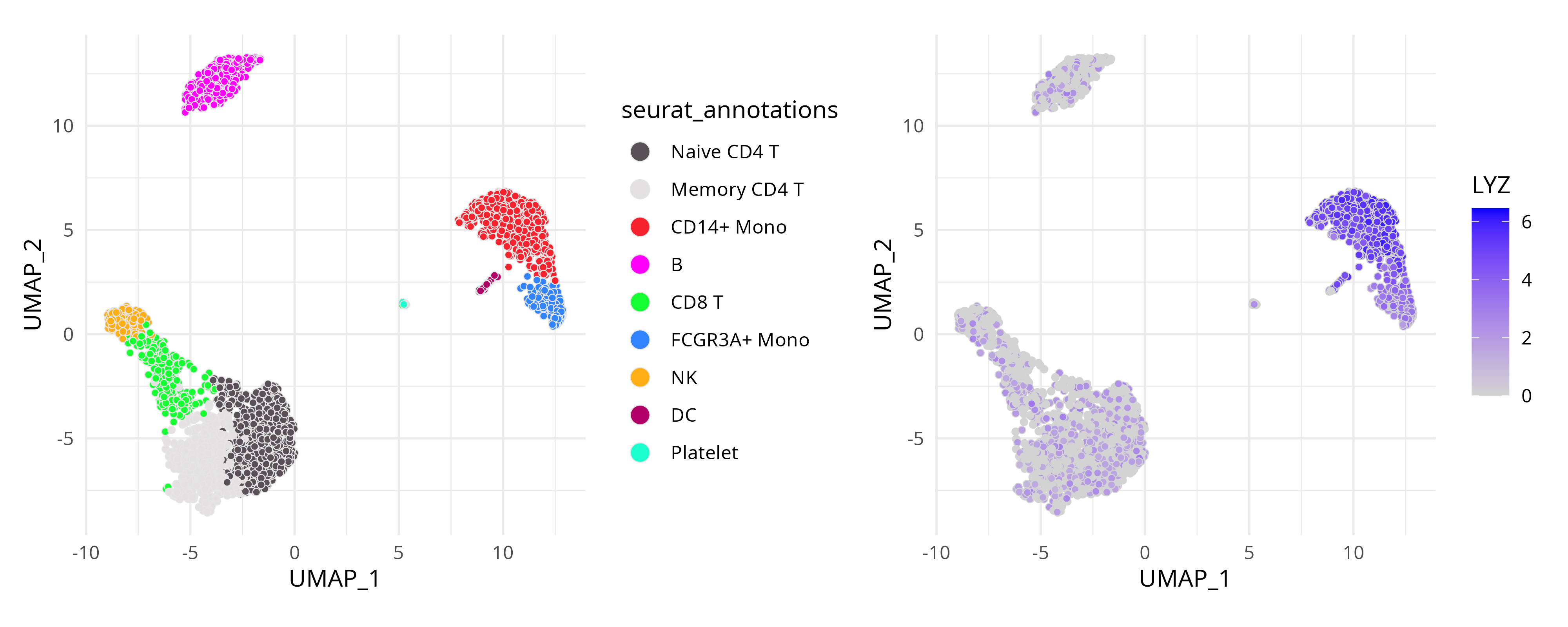
Coercing Seurat objects
The as.GraphSpace() function provides a convenient way
to coerce high-dimensional data into a GraphSpace object.
However, no coercion method can anticipate every possible data
structure. Below, we show how to access the relevant components of a
Seurat object and use them to construct a
GraphSpace manually. For another coercion example, see the
spatial data
tutorial.
# Extract UMAP embeddings as node coordinates
coords <- Embeddings(seurat_obj, reduction = "umap")
coords <- coords[, seq_len(2)] |> as.data.frame()
colnames(coords) <- c("x", "y")

# Extract cell metadata
metadata <- seurat_obj[[]]

# Merge coordinates and metadata using common cell identifiers
ids <- intersect(rownames(coords), rownames(metadata))
coords <- cbind(coords[ids, ], metadata[ids, ])

# Construct a GraphSpace object
# Metadata become node attributes
gs <- GraphSpace(coords)

# Add high-dimensional feature data
# Stored separately for lazy aesthetic mapping
gs_fdata(gs) <- SeuratObject::LayerData(seurat_obj, layer = "data")

# Optional: normalize node coordinates
gs <- normalizeGraphSpace(gs, mar = 0.01)
Session information
#> R version 4.6.1 (2026-06-24)
#> Platform: x86_64-pc-linux-gnu
#> Running under: Ubuntu 24.04.5 LTS
#>
#> Matrix products: default
#> BLAS:   /usr/lib/x86_64-linux-gnu/openblas-pthread/libblas.so.3
#> LAPACK: /usr/lib/x86_64-linux-gnu/openblas-pthread/libopenblasp-r0.3.26.so;  LAPACK version 3.12.0
#>
#> locale:
#>  [1] LC_CTYPE=en_US.UTF-8       LC_NUMERIC=C
#>  [3] LC_TIME=en_US.UTF-8        LC_COLLATE=en_US.UTF-8
#>  [5] LC_MONETARY=en_US.UTF-8    LC_MESSAGES=en_US.UTF-8
#>  [7] LC_PAPER=en_US.UTF-8       LC_NAME=C
#>  [9] LC_ADDRESS=C               LC_TELEPHONE=C
#> [11] LC_MEASUREMENT=en_US.UTF-8 LC_IDENTIFICATION=C
#>
#> time zone: America/Sao_Paulo
#> tzcode source: system (glibc)
#>
#> attached base packages:
#> [1] stats     graphics  grDevices utils     datasets  methods   base
#>
#> other attached packages:
#>  [1] patchwork_1.3.2           stxBrain.SeuratData_0.1.2
#>  [3] ssHippo.SeuratData_3.1.4  pbmc3k.SeuratData_3.1.4
#>  [5] SeuratData_0.2.2.9002     Seurat_5.5.1.9001
#>  [7] SeuratObject_5.4.0        sp_2.2-1
#>  [9] RGraphSpace_1.5.5         ggplot2_4.0.3
#>
#> loaded via a namespace (and not attached):
#>   [1] RColorBrewer_1.1-3     rstudioapi_0.19.0      jsonlite_2.0.0
#>   [4] magrittr_2.0.5         spatstat.utils_3.2-3   ggbeeswarm_0.7.3
#>   [7] farver_2.1.2           rmarkdown_2.32         fs_2.1.0
#>  [10] ragg_1.5.2             vctrs_0.7.3            ROCR_1.0-12
#>  [13] spatstat.explore_3.8-1 htmltools_0.5.9        sass_0.4.10
#>  [16] sctransform_0.4.3      parallelly_1.47.0      KernSmooth_2.23-27
#>  [19] bslib_0.11.0           htmlwidgets_1.6.4      desc_1.4.3
#>  [22] ica_1.0-3              fontawesome_0.5.3      plyr_1.8.9
#>  [25] plotly_4.12.0          zoo_1.8-15             cachem_1.1.0
#>  [28] igraph_2.3.3           mime_0.13              lifecycle_1.0.5
#>  [31] pkgconfig_2.0.3        Matrix_1.7-6           R6_2.6.1
#>  [34] fastmap_1.2.0          fitdistrplus_1.2-6     future_1.70.0
#>  [37] shiny_1.14.0           digest_0.6.39          tensor_1.5.1
#>  [40] RSpectra_0.16-2        irlba_2.3.7            textshaping_1.0.5
#>  [43] progressr_0.19.0       spatstat.sparse_3.2-0  httr_1.4.8
#>  [46] polyclip_1.10-7        abind_1.4-8            compiler_4.6.1
#>  [49] withr_3.0.3            S7_0.2.2               fastDummies_1.7.6
#>  [52] MASS_7.3-66            rappdirs_0.3.4         tools_4.6.1
#>  [55] vipor_0.4.7            lmtest_0.9-40          otel_0.2.0
#>  [58] beeswarm_0.4.0         httpuv_1.6.17          future.apply_1.20.2
#>  [61] goftest_1.2-3          glue_1.8.1             nlme_3.1-171
#>  [64] promises_1.5.0         grid_4.6.1             Rtsne_0.17
#>  [67] cluster_2.1.8.2        reshape2_1.4.5         generics_0.1.4
#>  [70] gtable_0.3.6           spatstat.data_3.1-9    tidyr_1.3.2
#>  [73] data.table_1.18.4      tidygraph_1.3.1        spatstat.geom_3.8-1
#>  [76] RcppAnnoy_0.0.23       ggrepel_0.9.8          RANN_2.6.2
#>  [79] pillar_1.11.1          stringr_1.6.0          spam_2.11-4
#>  [82] RcppHNSW_0.7.0         later_1.4.8            splines_4.6.1
#>  [85] dplyr_1.2.1            lattice_0.23-1         survival_3.8-11
#>  [88] deldir_2.0-4           tidyselect_1.2.1       miniUI_0.1.2
#>  [91] pbapply_1.7-4          knitr_1.51             gridExtra_2.3.1
#>  [94] scattermore_1.2        xfun_0.59              matrixStats_1.5.0
#>  [97] stringi_1.8.9          lazyeval_0.2.3         yaml_2.3.12
#> [100] evaluate_1.0.5         codetools_0.2-20       tibble_3.3.1
#> [103] cli_3.6.6              uwot_0.2.4             xtable_1.8-8
#> [106] reticulate_1.46.0      systemfonts_1.3.2      jquerylib_0.1.4
#> [109] dichromat_2.0-1        Rcpp_1.1.2             globals_0.19.1
#> [112] spatstat.random_3.5-0  png_0.1-9              ggrastr_1.0.2
#> [115] spatstat.univar_3.2-0  parallel_4.6.1         pkgdown_2.2.0
#> [118] dotCall64_1.2          listenv_1.0.0          viridisLite_0.4.3
#> [121] scales_1.4.0           ggridges_0.5.7         crayon_1.5.3
#> [124] purrr_1.2.2            rlang_1.3.0            cowplot_1.2.0