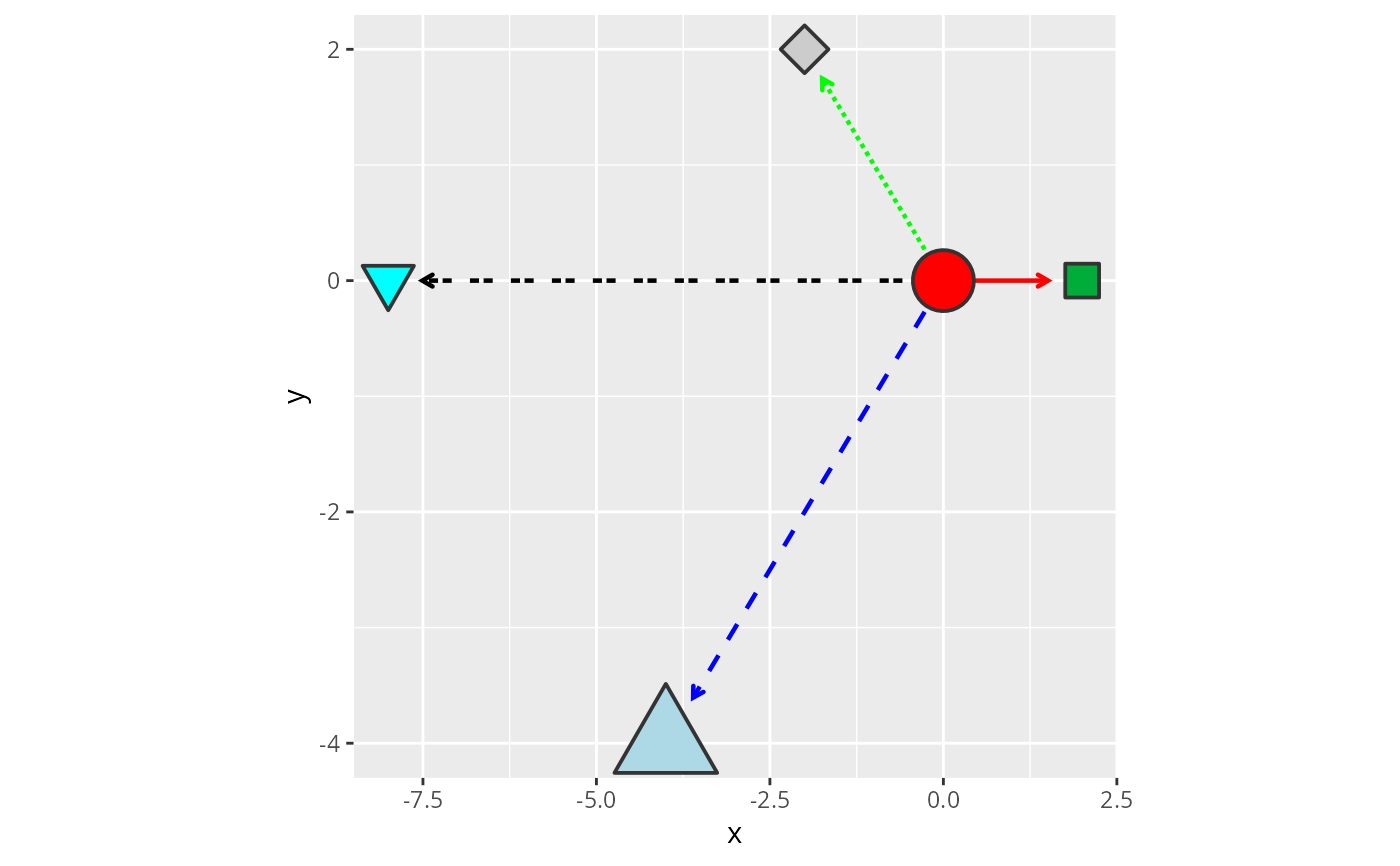
Constructor for GeomEdgeSpace ggproto objects.
A wrapper around geom_segment that bridges GraphSpace edge attributes with ggplot2 rendering via two distinct aesthetic interfaces that coexist without collision (see Two aesthetic interfaces section).
Usage
geom_edgespace(
  mapping = NULL,
  data = NULL,
  stat = StatEdgeSpace,
  position = "identity",
  ...,
  na.rm = FALSE,
  show.legend = NA,
  inherit.aes = FALSE,
  arrow_size = 1,
  arrow_offset = 0.01,
  curve = 0,
  coord_warp = 1,
  parallel_spread = 1,
  loop_direction = "adaptive",
  lineend = "butt",
  linejoin = "mitre",
  raster = FALSE,
  dpi = NULL,
  dev = "cairo",
  scale = 1
)

edgespace_handler()
Arguments
- mapping
Set of aesthetic mappings created by
ggplot2::aes(). These mappings override global aesthetics and are not inherited from the top-level plot.- data
The data to be displayed in this layer. It can be a GraphSpace object, an igraph object, or the
edgespace_handler()closure. WhenNULL(default), a handler is created internally.- stat
The statistical transformation to use on the data. Defaults to
identity.- position
Position adjustment, either as a string or the result of a call to a position adjustment function.
- ...
Additional parameters passed to the underlying drawing function in GeomEdgeSpace.
- na.rm
Logical. Should missing values be removed? Defaults to
FALSE.- show.legend
Logical or a named logical vector indicating whether this layer should be included in legends.
- inherit.aes
Logical. If
FALSE(default), the layer will use aesthetics defined inmapping.- arrow_size
Numeric scaling factor controlling the size of edge glyphs, such as arrowheads (see 'details').
- arrow_offset
Numeric value controlling the base offset of arrows at edge endpoints (see 'details').
- curve
Numeric. Controls edge curvature, as a fraction of edge length. Non-zero values bow the edge into a smooth curve, and the sign controls which side it bows toward. Ignored for loops and parallel edges (see 'details').
- coord_warp
Numeric (>=0). Bend applied to edges under non-linear coordinate systems, so that curvature follows the coordinate system's warping. Defaults to 1; has no effect under linear coordinates (see 'details').
- parallel_spread
Numeric (>=0). Controls the lateral spread of parallel edges and self-loops. Ignored for simple non-loop edges (see 'details').
- loop_direction
Controls how self-loops are oriented around their node. Options:
'adaptive'(default),'opposite', and an angle in degrees (see 'details').- lineend
Line end style (
'round','butt','square'). Supplied for compatibility with geom_segment.- linejoin
Line join style (
'round','mitre','bevel'). Supplied for compatibility with geom_segment.- raster
Logical. Should node glyphs be rasterized? Rasterization support is based on
rasterise.- dpi
Numeric. Rasterization resolution.
- dev
Character. Rasterization backend. One of
'cairo','ragg','ragg_png', or'cairo_png'.- scale
Numeric. Rasterization scaling factor (see
rasterise).
Value
A ggplot2 layer that renders edge segments defined by GeomEdgeSpace.
Details
arrow_size is a numeric scaling factor controlling the size of edge
glyphs (arrowheads and other end symbols). The value is interpreted in
the same numeric space as line width (lwd).
arrow_offset is an additive term that offsets arrow endpoints uniformly in graph space and is bounded by the edge length, in NPC units of the shorter panel side.
The glyphs drawn at edge ends are set by the arrowType edge
attribute (see GraphSpace and glyph_list).
curve bows an edge through a control point displaced perpendicular
to the edge, by curve times the edge length. curve = 0
(default) renders a straight edge. Typical visible values range from
about 0.1 to 0.4; sign sets which side the edge bows toward.
coord_warp bends edges under non-linear coordinate systems, for
example coord_sf with a default_crs,
coord_polar, or coord_trans, so that
edge curvature follows the coordinate system's warping rather than
cutting across it. coord_warp = 1 (default) applies the exact
deviation between the warped edge midpoint and the midpoint of the
warped endpoints; coord_warp = 0 disables it. Values above 1
exaggerate the bend, but may give erratic results under strongly warped
coordinate systems. The bend indicates the coordinate system's influence
on the graph's extent; it does not depict a path through space.
parallel_spread controls the fan opening for parallel edges,
reciprocal A->B/B->A pairs, and self-loops – anything
where multiple edges share the same vertex pair. curve has no
effect on these edges; parallel_spread governs both their
curvature magnitude and how far apart they fan. A value of 0
collapses all edges in a group onto the same position; increasing
values progressively open the fan. Self-loops behave the same way:
a single loop uses parallel_spread to set its own size, and
multiple loops at the same node fan out accordingly. A built-in
minimum, tied to arrow_size and node size, keeps small
parallel_spread values from producing a loop whose arrowhead
looks skewed against its own curvature.
loop_direction determines where self-loops sit relative to their node.
"adaptive" (default) points each loop in the direction that faces
away from the graph's centroid. "opposite" is a two-sided
arrangement: loops are split into two groups placed above and below the
node. A numeric angle (in degrees) places all loops at a fixed direction
regardless of their node's position in the layout. When node position data
is unavailable, "adaptive" silently falls back to "opposite".
Aesthetics
geom_edgespace() understands geom_segment aesthetics.
If these aesthetics are not explicitly provided in aes(), they
are automatically retrieved from the GraphSpace object.
x, y, xend, yend | Required; automatically supplied. |
colour | Edge colour (see aes_colour_fill_alpha). |
alpha | Transparency (see aes_colour_fill_alpha). |
linetype | Edge line type (see aes_linetype_size_shape). |
linewidth | Edge line width (see aes_linetype_size_shape). |
All required aesthetics are supplied from the GraphSpace object and do not need to be manually mapped.
Fixed identity values can also be passed directly as parameters, bypassing
both graph attributes and scale training.
For example: colour = "grey", linetype = 2, linewidth = 1.
Edge glyphs (arrowheads and other end symbols) can be further adjusted by
arrow_size and arrow_offset arguments (see details).
Two aesthetic interfaces
geom_edgespace() supports two interfaces that coexist without
collision: graph attributes (camelCase names such as edgeColor,
edgeLineWidth) and ggplot2 mappings (via aes()). See comments
in the vignette.
When multiple sources provide the same aesthetic, priority follows:
aes() mapping > fixed parameter > graph attribute.
Label aesthetics
When label is mapped via aes(), a text label is drawn at
the visual midpoint of each edge. Labels follow the rendered edge geometry:
the chord midpoint for straight edges, the Bezier midpoint for curved edges,
and the loop apex for self-loops. Edges with NA labels are silently
skipped.
The label_colour aesthetic defaults to the edge colour, and
label_alpha defaults to the edge alpha. All other
label_* aesthetics default to geom_label
when not set.
label | Required to activate label rendering. |
label_colour | Label text colour
(see geom_label). |
label_alpha | Transparency
(see geom_label). |
label_fill | Background colour
(see geom_label). |
label_size | Font size
(see geom_label). |
label_angle | Rotation angle
(see geom_label). |
label_hjust | Horizontal justification
(see geom_label). |
label_vjust | Vertical justification
(see geom_label). |
label_lwd | Border linewidth
(see geom_label). |
label_lty | Border linetype
(see geom_label). |
label_family | Font family
(see geom_label). |
label_fontface | Font face
(see geom_label). |
label_lineheight | Line height
(see geom_label). |
Examples
library(RGraphSpace)
library(igraph)
library(ggplot2)

# Load a demo igraph
data('gtoy1', package = 'RGraphSpace')

# Create a GraphSpace object
gs <- GraphSpace(gtoy1)
#> Validating the 'igraph' object...
#> Ignoring graph-level attributes: 'name', 'mode', 'center'
#> Creating a 'GraphSpace' object...

ggplot(gs) +
  geom_edgespace() +
  geom_nodespace() +
  theme(aspect.ratio = 1)